
This document is the map: what O2I consists of, how an order becomes an invoice and a cost, what it connects to, and what it does not do. The details are in the other architecture documents: Data model (A-02), Access and security model (A-03), Sizing and performance (A-04) and How the modules work together (A-05).
1. What O2I is
O2I (Order-to-Invoice) is a set of scoped applications on ServiceNow. It takes what people order or report, keeps it as subscriptions and time, bills it in controlled billing runs, and posts the result to a cost pool where it is compared with budget and forecast.
- Several sellers on one instance. A seller is a legal entity that sells and bills. Many sellers can share one instance, each with its own currency, fiscal year, prices, staff and settings, and none sees another’s data.
- Built on the platform’s own records. Companies, users, cost centers, services and offerings from the Service Portfolio, the Service Catalog and contracts are the platform’s. O2I adds what billing needs around them; it does not copy them.
- Nothing is final until it is approved. Subscriptions, transactions and time can be corrected freely. A billing run is a draft until a finance controller approves it, and an approved line never changes; a correction is a new line.
2. The apps
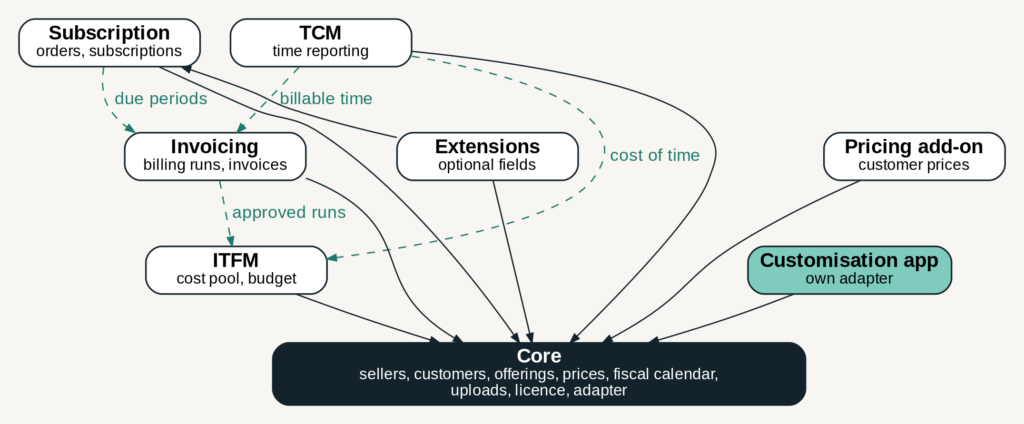
| App | What it does | Needed? |
|---|---|---|
| Core | Sellers, customers, billing accounts, offerings and prices, the fiscal calendar, GL accounts and tax, roles, file uploads, the licence, demo data, and the adapter that reads instance-specific things | Always |
| Subscription | Orders from the Service Catalog or files become subscriptions, with approval, delivery, changes and cancellation | Optional |
| Pricing add-on | Prices and discounts agreed with one customer | Optional |
| Invoicing | Billing runs, billable transactions, invoices with VAT, summaries for the customer and the ERP, marketplace vendor settlements | Optional |
| ITFM | The cost pool with actuals, budget, forecast, variance, vendor costs and true-up | Optional |
| TCM | Weekly time reporting and approval; billable time to Invoicing, internal time to ITFM | Optional |
| Extensions | A few optional fields on platform tables and an adapter that reads them | Optional |
| Customisation app | The installation’s own adapter and fulfilment handler: where an instance differs from the standard | Only when the instance differs |
Three rules hold the apps together:
- Every app depends on Core, and Core depends on none of them. Extensions also depends on Subscription.
- An app that is not installed never breaks another. Every call across apps first checks that the other side is there; a missing app means “nothing to add”. You can run Core and Subscription alone, or Core, TCM and ITFM without Invoicing.
- Instance differences live in one place, the adapter. The product’s code is never changed by an installation, so it can be upgraded.
How the apps reach each other (handlers, hooks, events and the adapter) is in How the modules work together.
3. From order to cost pool
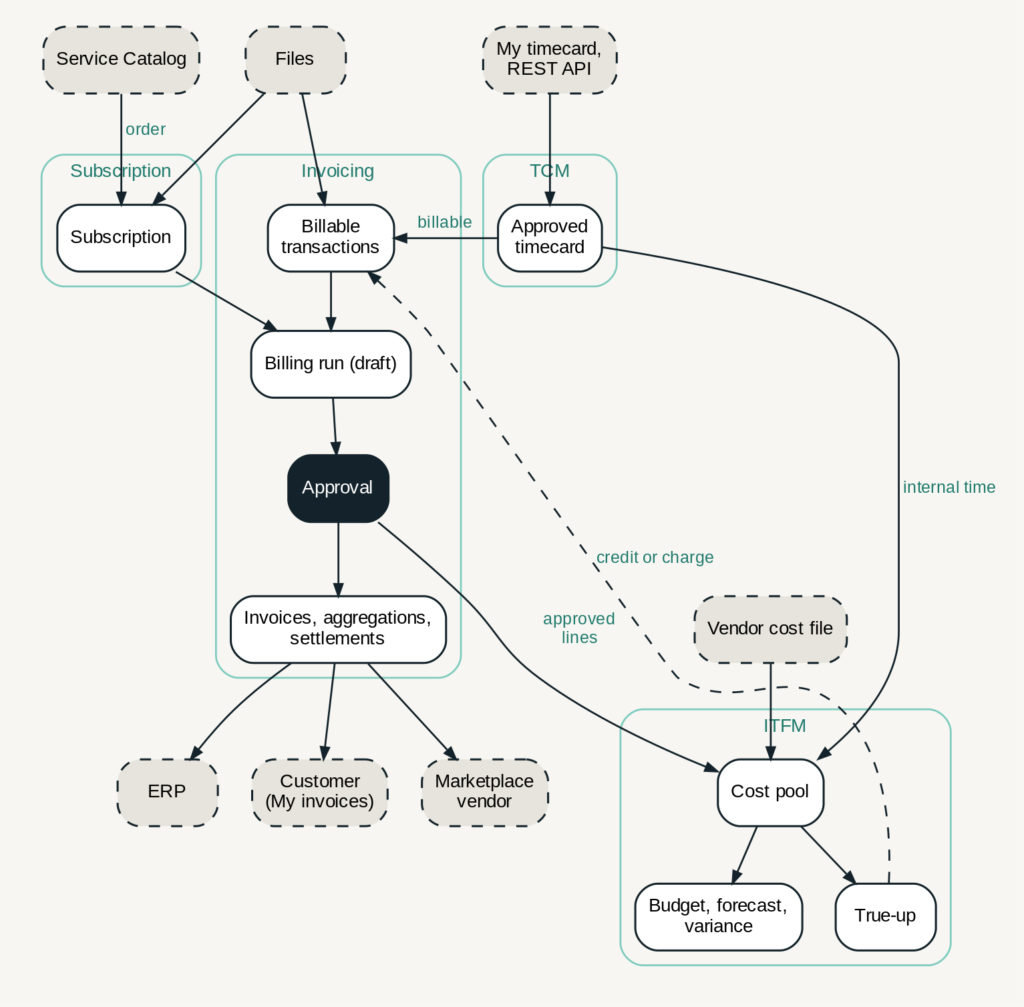
- Order. A user orders an offering in the Service Catalog, or subscription support registers it, or a file brings many at once. One validation checks every one of them. The order is approved (by the manager, or the contract’s business contact) and delivered, and becomes an active subscription: this customer has this offering, in this quantity, from this date.
- Other things to bill. One-time charges and usage arrive as billable transactions, from files or from the catalog. Approved billable time from TCM becomes transactions too. Expense lines from the platform’s Cost Management can be taken in as well, when that is switched on.
- Billing run. For one seller and a cutoff date, a run collects every subscription period and transaction that is due, prices each one (the subscription’s fixed price, a customer price, an internal price, or the list price less any account discount, in that order) and builds a draft. Anything that cannot be priced or mapped becomes an exception and waits; nothing is guessed.
- Draft work. Controllers refresh the draft, correct lines, hold lines back or discard the run. Nothing is locked yet.
- Approval. A finance controller approves, by hand or on a schedule. The lines are frozen; the customer aggregation and the ERP aggregation are built and must add up to the priced total; invoices with VAT are numbered if the seller uses them; a marketplace seller gets vendor settlements.
- Out to others. The ERP aggregation is exported to the ERP and marked delivered. Customers see their approved invoices under My invoices; vendors see their settlements.
- Cost pool. The approval tells ITFM, which posts the lines as actuals in the cost pool, spread over the months they cover. Approved internal time and uploaded vendor costs are posted too. An hourly sweep posts anything an event missed.
- Follow-up. Service owners compare actuals with budget and forecast. Inside a group, a true-up can bill a service’s buyers so that the service bills what it cost; its credits and charges go back to Invoicing as transactions for the next run.
4. What O2I connects to
O2I has no built-in connection to an outside system. Everything goes in or out through the platform, files and one REST API.
| Outside O2I | Direction | How |
|---|---|---|
| Users ordering | In | Service Catalog items and the Employee Center pages (My subscriptions, My invoices, My timecard) |
| ERP | Out, and corrections back | The ERP aggregation is exported (Excel or CSV) and marked delivered. Corrections the ERP needs (GL, cost center, account) come back by hand or as an ERP adjustment file. O2I does not call the ERP |
| Other systems with things to bill | In | Files: subscriptions, billable transactions, time transactions, offering prices (see File formats) |
| Time reporting systems | In | The REST API for time entries (see API reference) |
| Vendors | In | Vendor costs as a file into ITFM. Marketplace vendors see their settlements in O2I |
| Cost Management (platform) | In, optional | The expense line bridge takes Cost Management expense lines to bill |
| Customers | Out | Invoices exported as Excel or CSV and sent by the seller; approved invoices visible in the Employee Center |
Platform records O2I reads: companies, users, groups, cost centers, services and offerings (Service Portfolio), catalog items and requested items, contracts with their covered items and users, incidents (to link them to a subscription), and the user time zones. Which fields it reads, and how an instance that keeps them elsewhere is handled, is in the Adapter and customisation guide.
5. Sellers, roles and what people see
- Staff see only the records of the sellers whose seller groups they belong to. Every business record carries its seller.
- What a person may do comes from O2I roles, given through groups: finance controller, subscription support, service owner, seller admin and others.
- Customers see only their own subscriptions and their own approved invoices. Vendors see only their own settlements.
- Access is checked by the platform’s access rules, so the same limits hold in lists, forms, reports and the APIs.
The full model is in Access and security model.
6. How it is delivered and licensed
O2I is sold as two products, which together are FairyWare Order to Invoice:
| Product | Modules | Add-ons |
|---|---|---|
| Draupnir (subscriptions) | Core, Subscription | Extensions |
| Gungnir (billing and IT finance) | Core, Invoicing | Pricing, ITFM, Time reporting (TCM) |
Each product works on its own; with both, Invoicing bills the subscriptions. Core is installed once whichever is bought.
- Each app is installed separately, Core first, then the other apps in one go. Installing and upgrading are in the Installation guide and the Upgrade guide.
- A new installation runs a 14-day trial without a key. After that, a licence key opens the modules bought, until a date, on one named instance, for a number of sellers. When a licence ends, the data stays readable. See the Licence guide.
- Properties, scheduled jobs and the setup are described in the Setup and configuration guide and the Operations guide.
7. What O2I does not do
Outside the product’s scope:
- No direct ERP integration: the ERP aggregation is the deliverable, and moving it is the installation’s job.
- No vendor integration: vendor costs arrive as files.
- No domain separation: sellers are kept apart by groups and access rules, not by platform domains.
- No payment tracking: O2I creates and numbers invoices; whether they are paid is followed in the ERP.
Not in this version: Word or PDF invoices, price changes in the middle of a billing period, gross prices in the web shop, commission per offering, minimum terms and automatic renewal.